
Pitch Planner Pitch Planner
Features reference

What Pitch Planner helps with on match day.

Two tools, one roster, zero cost. Match Day covers the game itself, lineup setup through the post-match recap. Team Manager covers everything between: rosters, attendance, and shared access for coaches and parents. Use this page to see what you can set up before the match, what you can track during it, and what you can review afterward.

Match Day

From kick-off to final whistle.

Match Day keeps the lineup, clock, substitutions, and player minutes in the same place. The buttons are meant for quick use on the touchline. Check the next sub, make the swap, and get back to watching the game.

ATK
7v7 · 2-3-1
#7EmmaST
#10SamLM #12AlexCM #4JordanRM
#3PriyaLB #8MayaRB
#1KaiGK
Bench · 5 subs
  • 9Noah
  • 11Zoe
  • 6Luca
  • 5Mila
  • 2Theo
Lineup builder

Pick a formation, drop in your players.

The lineup builder replaces the clipboard with a visual pitch. Pick your field size (4v4 through 11v11), pick a formation, then tap a position to assign a player. Swap anyone in one tap. When you find a lineup that works, save it and re-use it next match.

Pitch Planner ships with the two most common formations per field size. 7v7 coaches get 2-3-1 and 3-2-1. 9v9 gets 3-2-3 and 3-3-2. 11v11 gets 4-3-3 and 4-4-2. Switching between them is a single tap, and your assigned players stay where their positions translate.

What you can do
  • Set up a lineup for any field size from 4v4 to 11v11
  • Switch formations mid-setup without losing your player assignments
  • Save up to 3 starting lineups per team and load any of them before kick-off
  • Copy last match's lineup as a starting point, then edit
  • Tap any player on the pitch to swap them with a bench player
  • Every position labelled, every jersey number shown
Good for

Best for volunteer coaches who need a simple lineup they can explain quickly. Also useful when a team moves between 7v7 and 9v9 and you do not want to redraw the same shape every week.

Rotation · 8 min50 min
7Emma
10Sam
12Alex
9Noah
11Zoe
On Bench
Rotation planner

Plan every substitution before kick-off.

The rotation planner is the answer to "who's coming on next?" Pick an interval (6, 8, or 10 minutes) and match length, and Pitch Planner generates a full substitution schedule that spreads minutes evenly across your roster. By the time kick-off arrives, you already know what every minute of the match looks like.

The plan runs as a visual timeline: rows per player, columns per interval, green for on the field, slate for bench. An amber "sub now" indicator appears at every transition so you never miss a swap. You can override any slot by hand and the planner will rebalance around your change.

What you can do
  • Choose 6, 8, or 10-minute rotation intervals
  • Auto-balanced minutes based on target playing time
  • Clear visual timeline for every slot of the match
  • Amber "sub now" dot at each transition
  • Override individual slots, plan rebalances around you
  • Account for players missing part of a match
Good for

Rec leagues where equal playing time is the rule. Coaches with 11+ players on the bench and no obvious rotation. Pre-match prep in the 10 minutes before kick-off.

24:18
Match clock
7 Emma 18:12
11 Alex 9:42 · over
4 Sam 12:04
9 Priya bench · 5:22
#4 Sam #9 Priya Tap to confirm
Live match

The clock, the subs, the stats.

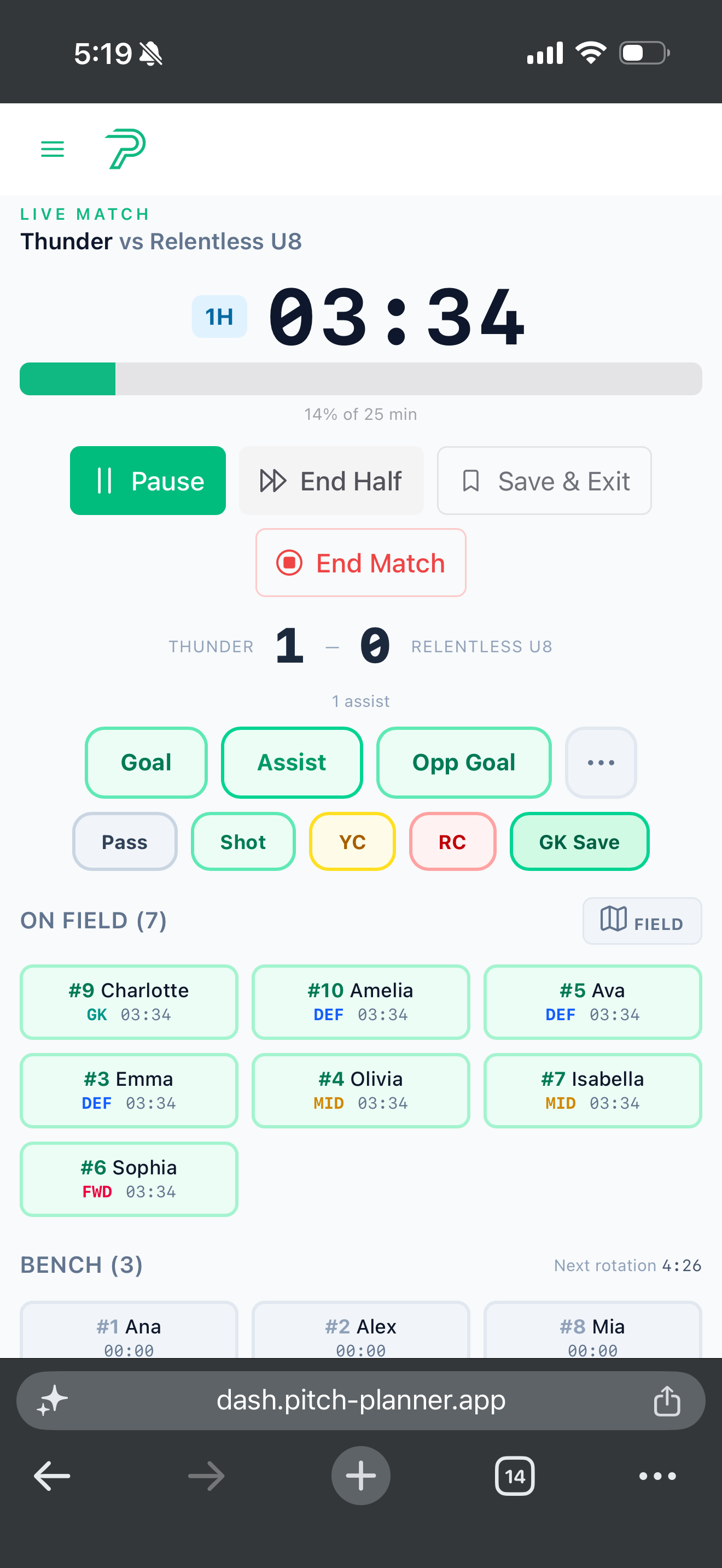
During the match, the live match screen is what you look at when you need information fast. Big monospaced clock at the top, per-player minutes ticking in a list, one tap to pause, two taps to sub. No dragging, no menus.

Every player has their own counter. When they're on the field, their counter ticks with the match clock. When they're on the bench, it pauses. The moment a substitution happens, the outgoing player's counter freezes and the incoming player's resumes. The match clock itself never stops unless you tap pause, which halts every player's counter at the same instant, useful for water breaks, injuries, or a ref stoppage.

To make a substitution, tap a player on the bench, then tap the player coming off. Done, the swap is logged and the clocks adjust. If a player is close to their target percentage when you make the swap, the app tells you; if a player on the field has exceeded their target, their jersey pulses amber so you know to rotate them off next.

What you can do
  • Live match clock with per-player minutes tracking
  • One tap pauses every player's clock at the same time
  • Two-tap substitution: bench player, then player coming off
  • Amber pulse on jerseys that have exceeded their target minutes
  • Goals, assists, and cards logged without leaving the match view
  • Screen wake-lock keeps your phone on the match view
  • Works offline, syncs when your phone is back on Wi-Fi
  • Large buttons, readable contrast in bright sun
Good for

Coaches running a game solo, without an assistant at the scoreboard. Fields with no Wi-Fi and spotty cell. Morning matches where you'd otherwise be squinting at a phone.

Live · 6/10 on target50%
  • 7
    Emma75%
    On
  • 4
    Sam46%
    Below
  • 12
    Alex58%
    On
  • 9
    Priya42%
    Below
  • 11
    Zoe67%
    On
  • 3
    Maya38%
    Below
Equal playing time

Set a minimum. Keep minutes fair.

The equal playing time feature replaces the spreadsheet you'd otherwise keep in the notes app. Pick a target percentage (40, 50, or 60% of the match) and Pitch Planner tracks every player's time against it, live, during the match. Green bar means they've hit the target. Amber bar means they're short.

The target picker is visible throughout the live match view. Flip between 40/50/60% to see how everyone's tracking under different rules. At the end of the match, anyone who fell short is flagged automatically in the recap, so you know who to start next week.

Targets persist per team. If your league enforces a 50% minimum or your club's philosophy is "everyone plays at least half," set it once and every match inherits the setting.

What you can do
  • Pick a minimum of 40%, 50%, or 60% playing time
  • Live color-coded bars: green on target, amber below
  • "On target" / "Below" chip next to every player's name
  • Flag in the post-match recap for anyone who fell short
  • Season totals roll up minutes across every match
  • Target setting persists per team, applies to every match
Good for

AYSO and rec leagues with mandatory minimum-minutes rules. Clubs with a "development-first" playing-time philosophy. Coaches answering "how much did my kid play?" after the game.

Final whistle2:47pm
Riverside U10 3
Westbridge FC 1
10/10
Target
3
Goals
2
Assists
Goals
  1. 08'7Emma1-0
  2. 34'11Alex2-1
  3. 41'7Emma3-1
Post-match recap

The recap writes itself.

When the final whistle blows, the post-match recap is already done. Final score, per-player minutes, goals, assists, cards, target-percentages, the playing-time flags, everything Pitch Planner tracked during the match, rendered in a card you can show parents on the drive home.

A goal timeline runs down the card: minute, scorer, assist, and running score. A player-of-the-match suggestion picks itself based on playing time, goals, and assists (you can override it). A playing-time summary flags anyone who fell short of the target.

Every match can be exported to CSV, one row per player, for coaches who want to keep their own records or share with club admins. Season stats roll up everything across every match: total minutes per player, goals per player, percent of matches started, games attended.

What's in the recap
  • Final score with both team names
  • Goal timeline: minute, jersey, scorer, assist, score
  • Per-player summary: minutes, percentage, target status
  • Player-of-the-match suggestion, editable
  • Yellow / red card tallies
  • Shots and saves
  • CSV export of the full match
  • Season stats roll up across every match
Team Manager

Between match days, too.

Match Day is what happens in the 90 minutes you're on the sideline. Team Manager is everything around it. Rosters, attendance, availability, and the people who help you run the season.

Roster · 12 playersU10 · 7v7
7
Emma
ST
10
Sam
LM
12
Alex
CM
4
Jordan
RM
3
Priya
LB
8
Maya
RB
9
Noah
ST
11
Zoe
LM
6
Luca
CM
5
Mila
CB
2
Theo
CB
1
Kai
GK
Roster

One roster, every match of the season.

The roster is the single source of truth for your team. Add each player once with a name, jersey number, and preferred position. That roster flows into every lineup, rotation plan, and match you run the rest of the season.

Roster size is capped at twice the field size, so an 11v11 team can hold up to 22 players, a 7v7 up to 14, a 4v4 up to 8. That's enough for every rotation scenario without encouraging clubs to roster-stack.

One account can hold up to 5 teams, so if you coach a U10 and a U12, or a boys' and girls' side at the same age, they live in the same place. Each team has its own roster, its own lineups, its own match history.

What's on a roster
  • Player name and jersey number
  • Preferred position (updates formation defaults)
  • Parent or guardian contact (optional)
  • Availability per match
  • Attendance history for practices
  • Season stats rolled up from every match
Access4 people
  • D
    Dan
    Head coach
    Owner
  • R
    Rae
    Assistant
    Co-coach
  • P
    Parents
    4 chat members
    Read
  • C
    Club admin
    Season stats only
    Stats
Coach and parent access

Invite who you want. They see what you let them see.

Every team has an owner (that's you, the head coach) and can invite up to two co-coaches with the same level of access: edit the roster, build lineups, run matches. Useful when an assistant runs practice or steps in when you're travelling.

Beyond that, you can invite up to three team managers who can run the match-day clock but not edit the roster. Good for club-appointed team managers or the "soccer parent" who always wants to help.

For everyone else, the team has a public share link. No login, no account, just a URL you can paste into a parent chat. It shows the schedule, match results, and season stats. Read-only. Revocable at any time.

Per team
  • 1 owner (head coach) — full access
  • Up to 2 co-coaches — full access
  • Up to 3 team managers — can run matches, no roster edits
  • Public share link — read-only, no login
  • Revoke any access at any time
Last 6 practicesApr 18
7 Emma
6/6
10 Sam
4/6
12 Alex
6/6
9 Priya
3/6
3 Maya
5/6
Present Late Absent
Attendance

Log who showed up. Spot patterns early.

Attendance tracking covers every practice, scrimmage, and custom event. Tap each player as you do roll call: present, absent, late, or excused. Pitch Planner saves the date and the status. After a few weeks, you can see who's committing and who's drifting, before it shows up as a match-day problem.

The lineup builder reads from attendance: if a player missed the last three practices, the app gently warns you before you start them. Not to punish the kid, but to catch the disconnect before it affects the team.

Attendance rates roll up per player, per month, per season. Parents who ask "how's my kid doing?" get a factual answer instead of a vibe.

What you can log
  • Practices, scrimmages, and custom team events
  • Per-player status: present, absent, late, excused
  • Date-filtered attendance rates per player
  • Lineup builder warnings for low attendance
  • Up to 50 events tracked per team on the free plan
Ready for kick-off?

Plan the lineup.
Run the match.

Free lineup, rotation, and playing-time tracking for youth soccer coaches. Set your team before kickoff, manage subs from your phone, and keep a clean match record after the whistle.